


A single shared calendar paired with a per-vehicle service log keeps every car in your household on schedule. The fastest way to build that system today: use Google Sheets + Google Calendar (free, flexible, works on any device), a calendar-first approach with receipt attachments (low friction if your family already shares a Google or Apple calendar), or a dedicated multi-vehicle app with automated reminders and built-in service history. Pick one and add your primary vehicle’s VIN, current odometer, and next oil-change reminder before you close this page.
- Google Sheets + Google Calendar: Free, fully customizable, easy to share with the whole household.
- Calendar + receipt photos: Lowest friction. Add a recurring reminder and attach a photo of each invoice to the event.
- Multi-vehicle app (Cathold, ServiceSage Auto): Automated reminders, receipt capture, and exportable service history in one place.
The Motorist Assurance Program confirms that clear service histories improve diagnostic accuracy and reduce unnecessary labor. Your owner’s manual is the authoritative starting point for every interval. Kwik Kar Oil Change & Auto Care can log service details during each visit if you prefer a shop-managed record.
Table of Contents
- How to create your family vehicle maintenance calendar in 30 minutes
- Which system fits your household’s habits?
- What should every service entry include?
- How do you set service intervals that actually fit your driving?
- How should you share access and assign roles across your family?
- Which apps and templates should you start with?
- How do you bring old paper receipts into your new system?
- What does the evidence say about keeping complete records?
- How do recurring reminders and calendar integration actually work?
- How do you divide maintenance responsibilities fairly?
- How do you keep everyone updated and make sure tasks get done?
- How do you sync your maintenance calendar across devices and platforms?
- Key Takeaways
- Why complete records matter more than most owners realize
- Let Kwik Kar Oil Change & Auto Care handle the record-keeping for you
- Useful sources and templates
- FAQ
How to create your family vehicle maintenance calendar in 30 minutes
A 20–30 minute setup gives you a working shared calendar and at least one complete vehicle entry, so reminders start running today.
Step 1: Build your vehicle catalog. For each car, record the VIN, a household nickname (e.g., “Blue Minivan”), year, make, model, and current odometer. Save this in a shared Google Sheet or a cloud folder every family member can access.

Step 2: Create the first vehicle entry. Open your chosen system, enter today’s date, current odometer, the last service performed, and set the next-service reminder. If you use Google Calendar, create a recurring event and invite all drivers.
Step 3: Photograph and attach receipts. Photographing receipts and storing them against the VIN in a cloud folder is an effective, low-cost way to build a permanent, timestamped log. Name each file: VIN + date + mileage (e.g., “1HGBH41JXMN109186_2026-03-15_62400”).
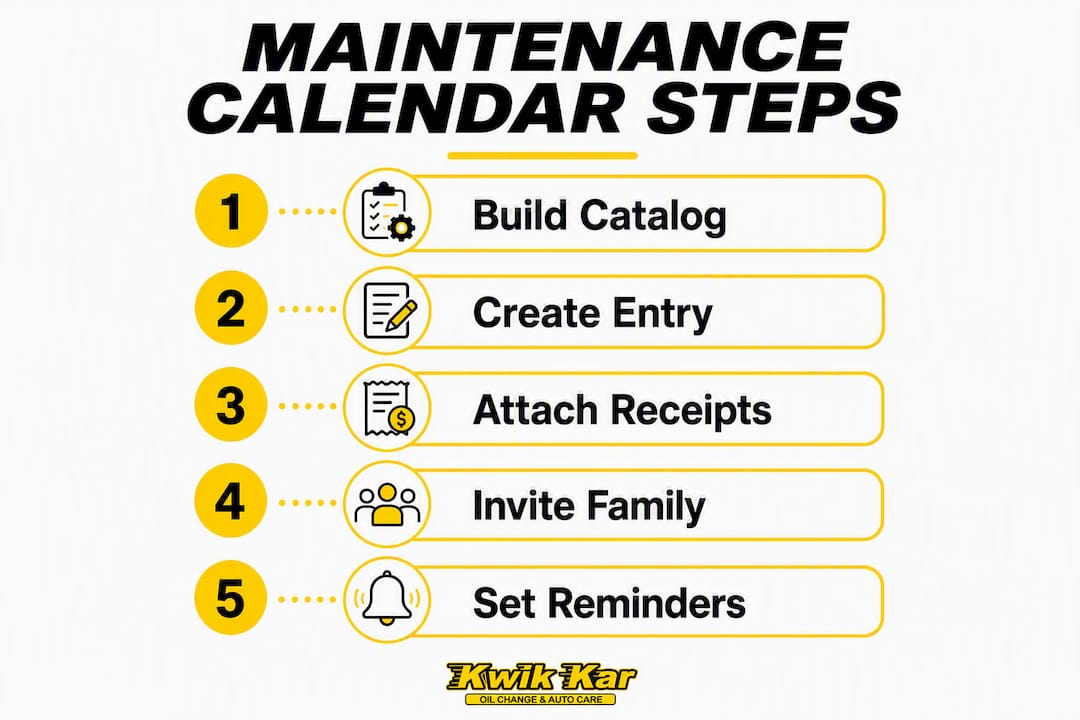
Step 4: Invite family members and test a reminder. Give maintainers full edit access. Set all other drivers to view-only or notify-only. Schedule a test reminder two weeks out (a tire rotation works well) to confirm everyone receives the notification.
Pro Tip: Set two reminders for every service item: one 30 days before the due date and one on the due date itself. Busy households consistently miss single-reminder systems.
Which system fits your household’s habits?
Pick the system that matches how your family actually updates records. If entries happen ad hoc after a service visit, a calendar-first solution wins. If one person maintains the log weekly, a spreadsheet is the better fit. If you want automation and don’t want to think about it, use a dedicated app.
| System | Best for | Price | Platform | Calendar sync | Receipt/history logging | Sharing |
|---|---|---|---|---|---|---|
| Google Sheets + Google Calendar | DIY/tech-comfortable families | Free | Web, iOS, Android | Manual recurring events | Manual entry + Drive attachments | Multi-user, role-based |
| Calendar + receipt photos | Low-friction households | Free | iOS, Android, Web | Native calendar sync | Photo attachments per event | Shared calendar invite |
| Cathold | Multi-vehicle cataloging | Free/paid tiers | Web, iOS | Reminder alerts | Service log per vehicle | Multi-user access |
| Vertex42 vehicle maintenance log | Excel/Sheets template users | Free download | Excel, Google Sheets | Manual | Spreadsheet rows | Shareable file |
| ServiceSage Auto | Multi-vehicle tracker | Free/paid tiers | Web, iOS, Android | Push notifications | History log + attachments | Multi-user, export |
A centralized digital solution reduces missed intervals and prevents double-booking across a multi-vehicle household. Non-technical households often do best with a cloud folder organized by VIN plus a single shared spreadsheet. A well-organized spreadsheet that everyone actually updates beats a sophisticated app that nobody opens.
What should every service entry include?
Record six fields at minimum: date, exact odometer, plain-language work performed, parts used (brand and part numbers where available), itemized cost, and service provider. Those six fields make an entry useful for warranty claims, resale negotiations, and future diagnostics.
The odometer at time of service is the single most critical data point. An oil change entry without a mileage reading is nearly worthless as evidence of proper maintenance, and warranty administrators frequently discount records that omit it. Parts brand and part numbers matter too: they confirm quality for warranty purposes and help a future technician match specifications.
Optional but high-value additions: VIN, service category (oil, brakes, tires, electrical), next recommended service date or mileage, and a short note about technician findings. These extras take 30 seconds to add and can save hours of diagnostic time later.
A well-documented maintenance history can boost a car’s resale value by roughly 10 to 20% compared with similar cars with no service history. Detailed logs shorten buyer negotiations and convert unverified claims into verifiable proof.
How do you set service intervals that actually fit your driving?
Set reminders by whichever trigger comes first: time or mileage. Start with the owner’s manual, which is the authoritative manufacturer-recommended schedule for your specific vehicle.
Maintenance intervals vary by item type: oil changes are typically mileage-driven, while brake fluid and coolant replacement are often time-based regardless of miles driven. A practical car maintenance checklist covers both categories.
Common interval examples to build into your calendar:
- Oil change: — Every 5,000 miles or 6 months (confirm in your owner’s manual; full-synthetic vehicles often extend to 7,500–10,000 miles).
If a family vehicle averages significantly more or fewer miles than the manufacturer’s assumed baseline, scale intervals proportionally. Track actual miles between services for two or three cycles, then adjust your reminders to match real usage.
Pro Tip: Log next-service both as a calendar date and a target odometer reading. That way, a reminder fires even when the car sits unused for weeks.
How should you share access and assign roles across your family?
Use role-based sharing: one or two maintainers hold full edit access to the log, and all drivers receive notification access only. This keeps records accurate while making sure everyone stays informed.
For a Google Sheets setup, share the file with edit rights for maintainers and view-only rights for other drivers. Use Google Calendar’s shared calendar feature to push reminders to all household members. For a dedicated app, assign admin rights to one person and set other family members as viewers or notification recipients.
The goal is a one-click reporting method: a driver should be able to photograph a receipt, add a short caption (date, mileage, service), and drop it in the shared folder in under 30 seconds. Friction is the enemy of consistent logging.
Notification lead times matter. Set 30-day advance reminders for registration renewals and annual inspections, and 7-day reminders for scheduled service appointments. Push and email reminders together cover both the person who checks their phone and the one who lives in their inbox. A monthly five-minute review of the tracker prevents overdue services and lets you book appointments before they become urgent.
Which apps and templates should you start with?
Start with one template and one app. Use the spreadsheet template if you want full control over fields and formatting. Use a multi-vehicle app if you want automated reminders and receipt capture without manual calendar management.
Three practical starting points:
- Vertex42 vehicle maintenance log template: — A free Excel/Google Sheets download with pre-built columns for date, mileage, service, cost, and provider. Ideal for households that already live in spreadsheets. Download directly from Vertex42’s site and share via Google Drive.
- Cathold: Built for vehicle cataloging across multiple cars. Useful for households that want a structured per-vehicle profile with service history attached. Check the best car maintenance apps list for current feature comparisons.
Test any new option with one vehicle for 7–14 days before migrating your full fleet. A system you actually use is worth more than a feature-rich one that collects dust.
How do you bring old paper receipts into your new system?
Photograph every receipt and invoice now, name the files by VIN + date + mileage, and attach them to the matching entry in your log. This approach is faster and adequate for warranty and resale purposes compared with expensive migration tools.
Migration steps:
- Gather all paper receipts, dealer invoices, and inspection reports.
- Photograph each document with the date and mileage visible (or written on the paper before shooting).
- Store images in a cloud folder named by VIN and add a spreadsheet row with the six core fields.
- Contact shops that serviced the vehicle and ask for a printed history. Dealers frequently keep VIN-linked records going back several years, and many owners recover two to three years of history this way.
Pro Tip: When memory is fuzzy, label the entry honestly: “approx. March 2022, ~85,000 mi.” A clearly marked estimate is far more useful than a blank row, and it will not mislead a future buyer or technician.
What does the evidence say about keeping complete records?
Well-kept maintenance records improve diagnostics, speed repairs, and add measurable resale value. This is supported by Motorist Assurance Program guidance and resale research.
| Evidence | Source | Practical implication |
|---|---|---|
| Clear service history improves diagnostic accuracy | Motorist Assurance Program | Technicians avoid redundant tests when prior work is documented |
| Odometer at service is the most critical data point | Magica car maintenance log guidance | Always log mileage; entries without it are frequently discounted |
| Resale value uplift with verifiable records | Sell Car Advisor resale analysis | Detailed logs shorten buyer negotiations |
| Detailed logs act as “trust currency” in private sales | Bumper ownership advice | Buyers reduce skepticism and negotiate less aggressively |
| Receipt photo tied to VIN and mileage is adequate proof | Zoooom maintenance records guide | No expensive software needed for warranty or resale documentation |
The minimum viable record set: date, odometer, work performed, parts, cost, and provider. Every field beyond that is a bonus that pays off at resale or during a warranty dispute.
How do recurring reminders and calendar integration actually work?
Google Calendar, Apple Calendar, and most dedicated apps support recurring events with custom intervals. For mileage-based items, create a calendar event at the estimated date when the mileage threshold will be reached, then adjust it after each service based on actual driving pace.
For task integration, connect your maintenance calendar to a shared family task list (Google Tasks or Apple Reminders both sync natively with their respective calendars). Assign each upcoming service as a task with a due date, and mark it complete after the appointment. This creates a lightweight audit trail without requiring a separate app.
Push notifications on mobile are the most reliable delivery method for busy households. Email reminders serve as a backup for family members who don’t check their phones during the workday.
How do you divide maintenance responsibilities fairly?
Assign ownership by vehicle, not by task. The driver who uses a car most often is the natural maintainer for that vehicle’s log. One household member should hold the role of “calendar owner” with responsibility for monthly reviews and reminder updates.
For shared vehicles, rotate the logging responsibility on a set schedule (monthly or quarterly) so no single person carries the full burden. A shared group chat or a pinned note in the cloud folder can serve as a lightweight communication channel for service updates.
How do you keep everyone updated and make sure tasks get done?
The most reliable system combines automated reminders with a visible shared log. When a reminder fires, the assigned driver confirms the appointment, logs the service within 24 hours, and marks the task complete. A monthly five-minute review by the calendar owner catches anything that slipped.
Use a simple status column in your spreadsheet: Upcoming, Scheduled, Done, Overdue. Color-coding these four states makes the household’s maintenance health visible at a glance without any additional tools.
How do you sync your maintenance calendar across devices and platforms?
Google Calendar and Google Sheets sync across iOS, Android, and web automatically when all family members are signed into the same shared account or have accepted the sharing invitation. Apple Calendar and iCloud Drive work the same way within the Apple ecosystem.
For cross-platform households (some members on Android, others on iPhone), Google’s suite is the most reliable common ground. Dedicated apps like ServiceSage Auto and Cathold offer their own cloud sync, so data entered on one device appears on all others in real time. Export your spreadsheet as a PDF or CSV quarterly so you always have an offline backup.
Key Takeaways
A shared vehicle maintenance calendar works best when one person owns the log, all drivers get notifications, and every service entry includes the odometer reading.
| Point | Details |
|---|---|
| Start with one complete entry | Add VIN, current odometer, and next-service reminder for your primary vehicle today. |
| Six fields per service entry | Date, odometer, work performed, parts used, cost, and service provider make every entry useful. |
| Records add resale value | Verifiable maintenance history can increase a vehicle’s private-sale value by roughly 10–20% compared with similar cars with no service history. |
| Two reminders per task | Set one reminder 30 days out and one on the due date to catch busy households. |
| Kwik Kar Oil Change & Auto Care | ASE-certified technicians can log service details, attach receipt photos, and provide exportable histories during each visit. |
Why complete records matter more than most owners realize
The conventional wisdom is that maintenance records are a nice-to-have, something you pull out when selling the car. That framing undersells them badly. A complete log changes how a technician approaches your vehicle from the first minute of a visit. When a shop can see what was replaced six months ago and at what mileage, they skip the guesswork and go straight to what’s actually due. That saves you money on labor and prevents the frustrating experience of paying for a diagnosis that a good record would have answered in 30 seconds.
The resale argument is real, but the diagnostic argument is more immediate. Every service visit where a technician has to reconstruct history from scratch costs time and, often, unnecessary parts. A household that keeps a clean log is a household that gets faster, more accurate service every time.
The other thing most guides miss: the log protects you when a warranty claim is disputed. Parts manufacturers and extended warranty providers routinely ask for proof of proper maintenance intervals. A timestamped receipt with an odometer reading is the difference between a covered claim and an out-of-pocket repair.
Let Kwik Kar Oil Change & Auto Care handle the record-keeping for you
If maintaining the log yourself sounds like one more thing on an already full plate, Kwik Kar Oil Change & Auto Care offers a practical alternative. During every maintenance visit, our ASE-certified technicians record your VIN, current odometer, and a complete itemized service summary. That entry becomes part of your vehicle’s documented history, ready to export when you need it for a warranty claim or a private sale.
You get the benefits of a well-kept service log without the manual work. Kwik Kar’s full-service maintenance and repair covers oil changes, brake service, tire rotation, diagnostics, and more, all performed by certified technicians with transparent pricing before any work begins. Check our current maintenance coupon for $30 off your next service with a free inspection. Book your visit online or call the shop to get your vehicle’s record started today.
Useful sources and templates
- Vertex42 vehicle maintenance log template — free Excel/Google Sheets download with standard service fields
- Motorist Assurance Program — maintenance records guidance — industry-backed case for keeping complete records
- Kwik Kar car maintenance checklist — compact eight-point routine maintenance guide
- Best car maintenance apps (2026) — reviewed shortlist of multi-vehicle tracking apps
- How a car maintenance schedule works — guide to translating manufacturer intervals into reminders
FAQ
What is the easiest way to create a family vehicle maintenance calendar?
Use Google Sheets for the service log and Google Calendar for reminders. Share both with all household drivers, assign one maintainer per vehicle, and set recurring reminders at 30 days and on the due date.
How many vehicles can I track in one spreadsheet?
A single Google Sheet can track unlimited vehicles using one tab per car or a shared table with a VIN column to filter by vehicle. Dedicated apps like ServiceSage Auto and Cathold also support multiple vehicles under one account.
What fields should every service entry include?
Record date, exact odometer, work performed, parts used (with part numbers), itemized cost, and service provider. The odometer reading is the single most critical field for warranty and resale purposes.
Can Kwik Kar Oil Change & Auto Care help me keep service records?
Yes. Kwik Kar Oil Change & Auto Care’s ASE-certified technicians document VIN, odometer, and full service details at every visit, giving you a verified, exportable record without manual logging on your end.
How do maintenance records affect resale value?
A verifiable maintenance history can increase a vehicle’s private-sale value by roughly 10–20% compared with similar cars that have no documented service history, and it typically shortens buyer negotiations.