


If you're managing a fleet with spreadsheets, service stickers, text messages from drivers, and a repair folder nobody fully trusts, you already know the pattern. One vehicle misses a routine service. A driver reports a noise too late. Someone scrambles to find the last brake job invoice. Then an unplanned breakdown turns into lost route time, customer frustration, and a repair bill that should have been avoided.
That is why fleet maintenance software reviews matter. You are not shopping for another dashboard. You are trying to control uptime, tighten maintenance discipline, and stop running your shop or vendor relationships in crisis mode.
The best fleet maintenance software gives you one place to track service intervals, inspections, work orders, costs, and vehicle history. But software alone doesn't fix vehicles. It only tells you what needs to happen and when. The missing piece, for many operators, is pairing digital control with a dependable service process on the ground, whether that work is handled in-house or through a trusted fleet maintenance partner.
Your Guide to Modern Fleet Maintenance Software
A fleet manager usually starts looking at software after the same kind of week. Two vans are overdue for service. One truck fails unexpectedly on the road. A driver says, “I thought that was already handled.” The office has a paper trail, but not a clean one. Maintenance data exists, just not in a form anyone can use fast.
That's where fleet maintenance software changes the conversation. Instead of reacting to the loudest problem, you build a repeatable system for vehicle health. Every asset has a record. Every service interval has a trigger. Every repair has context.
In practice, good software does three basic jobs well:
- It organizes maintenance history so managers can see what was done, when it was done, and what it cost.
- It triggers preventive work before small issues become roadside failures.
- It creates accountability across drivers, office staff, technicians, and outside service providers.
Field reality: The software isn't valuable because it looks modern. It's valuable because it reduces missed maintenance and cuts decision time when a vehicle comes in with a problem.
The strongest reviews don't just compare features. They answer practical questions. Can drivers complete inspections without friction? Can a shop or service partner use the work order details? Can managers spot cost-heavy vehicles quickly? Can the system support growth without becoming another admin burden?
Those are the questions that matter in real operations. Not every platform answers them equally well.
Understanding the Business Case for Fleet Software
Fleet maintenance software is best understood as air traffic control for vehicle health. Without it, service timing, inspection follow-up, and repair prioritization depend too much on memory and manual effort. With it, you can coordinate vehicle needs before they disrupt operations.

Why fleets are buying now
This category isn't growing because software vendors are good at marketing. It's growing because operators want tighter maintenance control and faster financial payback. The global fleet maintenance software market was estimated at $4.1 billion in 2025 and is forecasted to reach $14.5 billion by 2034, according to U.S. fleet maintenance software market projections.
That same source makes the business case practical. For a typical 50-vehicle fleet spending $1,800 annually on software, operators can expect to save $250 or more per month, with payback in under 8 months.
That matters because most fleet managers don't need a theoretical return. They need a clear path to fewer interruptions, less paperwork, and more predictable maintenance execution.
What the savings actually come from
Software usually pays off in boring, valuable ways:
Fewer missed services
When intervals are automated, vehicles are less likely to drift past routine maintenance.Less admin chasing
Office staff stop hunting through texts, invoices, and handwritten notes.Better repair timing
You can schedule work when the vehicle is available, not when it fails.
A disciplined fleet preventive maintenance program is where most fleets begin to feel the difference. The software becomes the control layer. The maintenance process becomes more predictable. Managers spend less time firefighting.
Good fleet software doesn't remove maintenance costs. It makes them visible, schedulable, and harder to ignore.
What doesn't make a business case
A polished interface alone isn't enough. Neither is a long feature list with weak adoption. If drivers won't use inspections, if technicians can't update work from the field, or if managers can't trust the records, the software turns into another reporting chore.
The business case only holds when the platform fits the daily rhythm of the fleet.
Core Features and Tangible Benefits
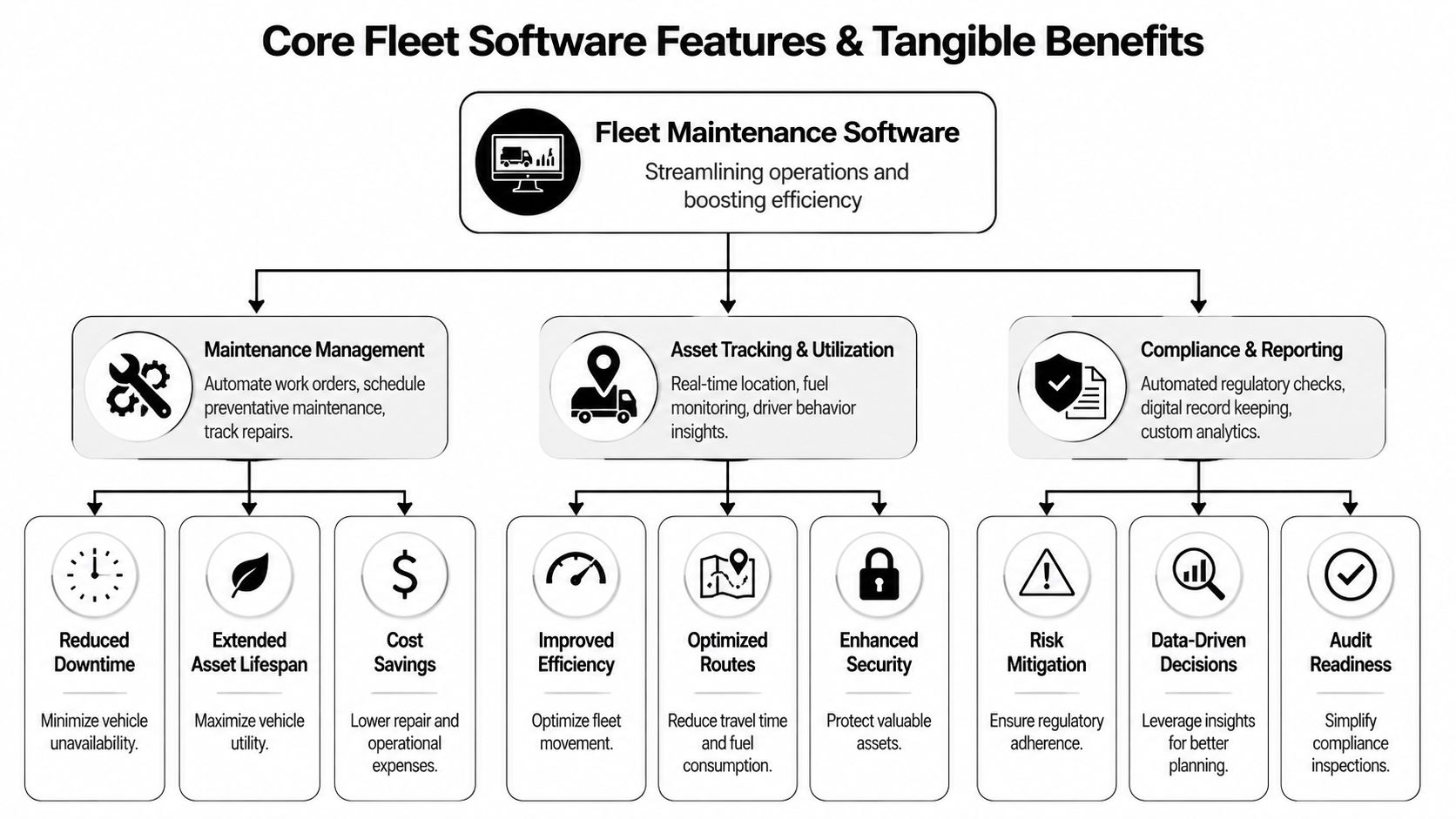
Most fleet maintenance software reviews get stuck listing features. That's not how operators buy. Fleet managers want to know what each capability changes on the ground.
Maintenance management that actually prevents chaos
The core of the system is maintenance scheduling, work order tracking, and service history. This functionality allows you to set preventive intervals, assign tasks, track completion, and build a clean vehicle record.
That sounds basic, but the operational impact is large. Fleets using preventive maintenance scheduling report 35 to 50 percent lower unplanned downtime and 15 to 25 percent lower total maintenance costs, according to G2 fleet management statistics.
That's why this feature matters more than flashy dashboards. If the software can't reliably trigger PM work and document repairs, the rest of the platform is secondary.
Telematics and asset visibility
The next layer is tracking vehicle use, fuel behavior, and operating patterns. Some platforms do this natively. Others rely on integrations. Either way, telematics becomes useful when it drives maintenance decisions, not just map visibility.
A few practical wins stand out:
- Fuel oversight: Fleets reported reduced fuel costs after telematics deployment. 55 percent reported lower fuel costs.
- Usage-based maintenance: High-mileage or hard-use vehicles can be serviced based on real conditions.
- Vehicle triage: Managers can spot the assets that are being overworked, underperforming, or neglected.
If you're comparing software across regions or mixed operating conditions, this overview of the benefits of fleet systems in New Zealand is useful because it frames the same operational themes many North American fleets face, especially around visibility, control, and route efficiency.
The strongest telematics setup doesn't just tell you where a truck is. It helps you decide whether that truck should be in service tomorrow.
Compliance, reporting, and audit readiness
Inspection records, DVIR retention, and maintenance documentation often get ignored until a claim, audit, or roadside issue forces the matter. Good software keeps those records accessible and consistent.
This matters for three reasons:
- Drivers can report defects quickly
- Managers can prove maintenance happened on schedule
- Service records are easier to retrieve during disputes or inspections
The gain here isn't just compliance. It's confidence. When every oil change, brake service, inspection, and repair is documented in one place, bad assumptions drop.
The feature trade-off many buyers miss
Not every fleet needs the deepest analytics package. Many need easier execution. A platform with strong reminders, clean mobile workflows, and simple work orders often beats a more advanced system that nobody updates.
That's the practical filter I use in fleet maintenance software reviews. Don't ask which platform has the most features. Ask which one your drivers, coordinators, and service partners will use every week.
How to Choose the Right Fleet Maintenance Software
Most bad software purchases start with a demo that looked impressive and an evaluation process that was too loose. The right way to buy is to score the system against operational fit, not sales polish.
Start with your operating model
A city delivery fleet, a contractor's mixed-light-duty fleet, and a multi-site service fleet don't need the same thing. Before looking at vendors, pin down your real needs:
- Maintenance-heavy fleet: Prioritize PM scheduling, work orders, and service history depth.
- Field-based team: Prioritize mobile usability, fast updates, and driver inspection workflows.
- Compliance-sensitive operation: Prioritize DVIR retention, audit trails, and documentation access.
- Growth-stage fleet: Prioritize scalability and integrations so the system doesn't break when vehicle count rises.
That's why generic software rankings can mislead. The best tool for another company may be wrong for your staffing model and service process.
Look for proof in daily workflows
Enterprise-grade systems like Verizon Connect are noted for automated scheduling and real-time diagnostics, while UpKeep CMMS is highlighted for mobile-first access to work orders and field data in this review of best fleet maintenance software tools. Those examples matter because they show what “good” looks like in practice.
When you evaluate vendors, ask them to show these workflows live:
- A driver submits an issue.
- A manager converts it into work.
- A technician or service provider sees the task.
- The system closes the job with records attached.
- The vehicle history updates automatically.
If the vendor can't demo that cleanly, the platform may be stronger in marketing than execution.
Use a scoring sheet, not memory
Below is a simple side-by-side framework. It keeps the conversation grounded when demos start blending together.
| Evaluation Criterion | What to Look For | Vendor 1 Score (1-5) | Vendor 2 Score (1-5) |
|---|---|---|---|
| Ease of preventive scheduling | Mileage, time, and recurring service triggers that are easy to configure | ||
| Mobile usability | Drivers and technicians can update inspections and work orders from the field | ||
| Service history depth | Complete, searchable records for repairs, PM, parts, and notes | ||
| Reporting clarity | Managers can quickly identify overdue work and problem vehicles | ||
| Diagnostics and alerts | Real-time diagnostics or integration with telematics data | ||
| Compliance support | DVIR handling, inspection records, and audit-ready documentation | ||
| Integration options | Connection to accounting, telematics, fuel, or other systems | ||
| Onboarding support | Practical implementation help, not just a knowledge base | ||
| Scalability | Can handle more vehicles, users, and locations without friction | ||
| Vendor transparency | Clear pricing, contract terms, and support expectations |
A related consumer-facing perspective on digital maintenance tracking is this roundup of car maintenance apps and tracking tools. The stakes are different for fleets, but the same lesson applies. If logging work feels clumsy, people stop doing it.
Buying rule: If a platform needs constant office babysitting to stay current, it isn't saving time. It's relocating the workload.
Ask the uncomfortable questions
Before signing, ask direct questions about support response, data migration help, field adoption, and how the system handles incomplete inspections or missed service events. Good vendors answer without deflecting. Weak ones redirect to features.
That difference usually shows up later in implementation.
Planning Your Software Implementation and Rollout
The buying decision gets attention. The rollout decides whether the software helps or stalls. Most fleet software failures aren't caused by bad intent. They come from rushed setup, weak training, and no clear ownership.

Clean up your data before day one
Historical maintenance records matter, but not all old data deserves migration. If your source files are inconsistent, importing everything can carry the mess into the new system.
Start with the records that are operationally useful:
- Vehicle master data: VINs, unit numbers, mileage, locations, assignments
- Active PM schedules: Oil changes, tires, brakes, inspections, recurring services
- Open issues: Current defects, pending repairs, outstanding service recommendations
- Recent history: Enough past work to support decisions and warranty context
If your team needs a structured outside reference for an asset management system setup, that implementation guidance is a helpful example of why planning and process discipline matter as much as software selection.
Train by role, not in one big session
Managers, drivers, and technicians use the system differently. Train them differently.
Drivers need to know how to complete inspections and report defects without friction. Managers need dashboard discipline, scheduling control, and reporting habits. Technicians or service coordinators need clean work order handling and documentation standards.
One generic onboarding session usually fails because each group leaves with only part of what it needs.
Rollouts succeed when every user knows the one or two actions they must complete every day, not when everyone sits through the same slide deck.
Pilot first, then expand
A phased rollout is safer than a full launch across the entire fleet. Start with a small group of vehicles, a few drivers, and a narrow maintenance scope. That lets you test service triggers, inspection workflows, and reporting before the whole operation depends on it.
A practical sequence often looks like this:
- Pilot one vehicle group
- Validate work order flow
- Adjust PM intervals and notifications
- Train the next user group
- Expand by location or department
That process feels slower up front, but it usually prevents bigger disruptions later. Adoption sticks when the software matches daily work instead of fighting it.
Common Red Flags and Pricing Models to Watch For
Some software problems are obvious only after the contract is signed. Others are visible during the sales process if you know where to look.
Red flags during evaluation
A few warning signs consistently show up in weak platforms or weak vendors.
They avoid live workflow demos
If the sales team keeps showing slides instead of real task flows, expect friction later.The interface looks dated or crowded
A clumsy system usually creates logging delays, skipped updates, and poor field adoption.Support answers stay vague
If nobody can explain implementation ownership, escalation paths, or data import help, expect a rough rollout.Pricing is hard to pin down
Hidden setup charges, unclear user limits, or loosely defined add-ons can distort total cost fast.Mobile use feels like an afterthought
Fleets live in vehicles, yards, and shops. If mobile workflows feel weak, the system won't hold up in real operations.
The main pricing models
Pricing isn't just about cost. It's about fit.
Per-vehicle pricing
This model is common and easy to understand. You pay based on fleet size.
It works well for fleets that want predictable budgeting and stable unit counts. The risk is that some vendors charge extra for features that seem basic once you're already committed.
Tiered subscription
These plans package features into levels. Lower tiers may cover reminders and records. Higher tiers add reporting, diagnostics, and integrations.
This can work if your needs are simple today and likely to grow. It becomes frustrating when a must-have feature sits one tier above where your budget started.
One-time license or custom enterprise contracts
Some larger systems price through custom quotes or less transparent structures. That may suit large, complex fleets with negotiating power and in-house process maturity.
For many operators, though, custom pricing makes comparison harder and often slows decisions.
Cheap software that drivers ignore is expensive. Higher-priced software that gets used consistently can be the better value.
What to ask before signing
Use plain questions:
- What does onboarding include?
- What costs extra?
- What happens if we add vehicles or users?
- How is support delivered after launch?
- Can we export our data cleanly if we leave?
Those questions reveal more than a polished feature sheet ever will.
How Kwik Kar Complements Your Fleet Software
Software can tell you a van is overdue for oil service, that brake wear was flagged in an inspection, or that a diagnostic issue needs attention soon. It cannot turn a wrench, verify the repair in person, or put the vehicle back into service.
That's the gap many fleet maintenance software reviews miss. The digital system is the control layer. The physical service partner is the execution layer.
A strong service partner helps the software strategy work in practice by doing a few things consistently well:
- honoring the maintenance schedule the fleet is trying to follow
- documenting completed services clearly so records stay accurate
- handling routine preventive work and diagnostic needs without unnecessary delay
- supporting light trucks, SUVs, sedans, and similar fleet vehicles in one repeatable process
- making it easier for managers to keep vehicles moving instead of chasing paperwork
When that partnership works, the software becomes more valuable because the maintenance actions happen on time. Work orders close cleanly. Service histories stay usable. Managers can trust the data because it reflects real shop activity, not guesswork.
That's the practical takeaway. The best fleet maintenance software doesn't win by itself. The fleets that get the most value pair disciplined digital tracking with reliable service execution on the ground.
If you're looking for a service partner that can support the actual side of your maintenance strategy, Kwik Kar Oil Change and Auto Care provides preventive maintenance, diagnostics, inspections, and fleet support designed to keep vehicles in service and easier to manage.